From our Client Area, click on Domains:
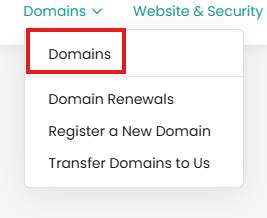
You will see a list of your domains. Check the boxes next to the domains you wish to change:

From here you can manage your nameservers, auto-renewal status, and edit your registrant information

Are you sure? The EPP / Auth code will be sent to your registered email address immediately.




From our Client Area, click on Domains:
You will see a list of your domains. Check the boxes next to the domains you wish to change:
From here you can manage your nameservers, auto-renewal status, and edit your registrant information
You can add the required DNS entries to connect your domain to GitHub via our DNS Manager. For...
WHOIS/Domain privacy is included free of charge for .ca domains registered to "Canadian...
From the Client Area, click Domains: On the left side you'll see a list of "Actions" -...
From the Client Area, click Domains: click anywhere in the row of the domain you wish to...
From our Client Area, click on Domains: Then click anywhere in the row of the domain you...
Powered by WHMCompleteSolution

You have read, understood and agree to the terms and conditions of the Registrant Agreement, and that CIRA may, from time to time and at its discretion, amend any or all of the terms and conditions of the Registrant Agreement, as CIRA deems appropriate, by posting a notice of the changes on the CIRA website and by sending a notice of any material changes to Registrant.
You meet all the requirements of the Registrant Agreement to be a Registrant, to apply for the registration of a Domain Name Registration, and to hold and maintain a Domain Name Registration, including without limitation CIRA's Canadian Presence Requirements for Registrants.
View Full Registrant Agreement
CIRA will collect, use and disclose your personal information, as set out in CIRA's Privacy Policy.